说明
免责声明
本网站的信息仅供参考。本网站不提供任何形式的保证。
内容
本网站旨在为超声谐振器设计提供一个集中的资源库。然而,它既不全面,也不是最终的定论。
- 查阅目录以查找特定主题。
- 当一个主题包含足够有用的信息时即会发布。因此,某个主题可能并不完整。请联系本网站,了解是否有更多信息可用。
- 如果您不确定某个术语的含义,请查阅术语表。
- 除非另有说明,所有谐振器均为 20 kHz 设计。不过,所有尺寸和机械性能都可以线性缩放到其他工作频率。(注意,在考虑负载影响的情况下,负载的影响不一定能线性缩放到其他频率。)
在可能的情况下,20 kHz"标准"设计的尺寸被选择为能够很好地缩放到其他常用频率(15 kHz、30 kHz、35 kHz 和 40 kHz)。这可以避免一些别扭的尺寸。例如,对于 20 kHz 圆柱形变幅杆,126 mm 的端面直径可以很好地缩放,而 125 mm 的直径则不能。(注:并非所有尺寸都能选择得缩放良好,尤其是缩放到 35 kHz 时。) - 当公式中出现乘法运算时,不显示乘号"x"(或"*")。但相邻的乘法因子之间总是至少用一个空格分隔,以区分各个因子。例如,牛顿第二运动定律将显示为 \( F = m \, \ddot{u} \) 而不是 \( F = m\ddot{u} \)。
- 除非另有说明:
- 对于实验测试,所有性能数据和调谐速率均包含驱动谐振器的换能器。
- 对于有限元分析,不包含换能器(即只分析谐振器)。
- 所有系统均为线性。
- 所有应力值均为 von Mises(冯·米塞斯)应力。
- 所有材料均假定为各向同性且均匀。
- 所有铝谐振器均由 Al 7075-T6 制成。
- 所有钛谐振器均由 Ti-6Al-4V 制成。
- 所有文字处理文档和电子表格均为 .od*(开放文档)格式,可用 OpenOffice 或 LibreOffice(免费办公套件)查看。
- 文中提及了多家供应商和制造商。然而,此类提及并不代表认可或推荐。
- 多位人士和公司惠允向本网站提供图片,并已注明致谢。然而,此类致谢并不代表认可或推荐。
| 频率 (kHz) | 端面直径 ("别扭"尺寸) |
端面直径 ("良好"尺寸) |
|---|---|---|
| 20 | 125.0 (缩放到下列其他频率时别扭) |
126.0 (缩放到下列其他频率时良好) |
| 15 | 187.5 | 189.0 |
| 30 | 83.333... | 84.0 |
| 35 | 71.429... | 72.0 |
| 40 | 62.5 | 63.0 |
单位
主要单位为公制。次要单位为英制。
|
||||||||||||
|
上表中,次要单位(仅偶尔使用)显示在方括号 [ ] 中。
振幅
重要 — 振幅传统上以峰-峰值表示。然而,加速度、应力和应变是由峰值振幅而不是峰-峰值确定的。因此,本网站将使用峰值振幅(少数历史遗留情况除外)。在可能引起混淆的文字中,振幅将写为"微米_峰值"。在公式中,振幅通常简写为 \( U \),隐含为峰值振幅。
图纸
见此处。
有限元分析(FEA)
方向
谐振器通常以输出端面朝上的方向显示。之所以选择这个方向,是因为端面振幅分布往往对应用最为重要。图纸也采用相同的方向。
颜色
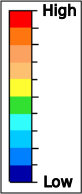 |
FEA 颜色显示振幅和应力的相对值 — 红色等暖色表示高值,而蓝色等冷色表示低值。除非另有说明,这些颜色不表示任何实际数值。因此,不同谐振器之间的颜色一般不能相互比较。例如,两个变幅杆可能都显示出"红色"应力区域。然而,这些红色区域只表示应力高的位置 — 并不表示两个变幅杆的应力同样高;事实上,一个变幅杆的应力可能比另一个高得多。 |
对于实际的谐振器,振幅和应力以连续方式变化(即不会发生突然的阶跃跳变),如下图左所示。然而,为了清楚地区分不同的性能区域,FEA 模型以条纹状颜色显示(下图右)。
|
||||||||||
|
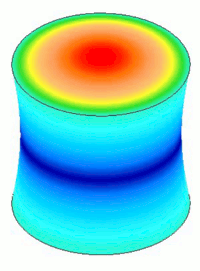
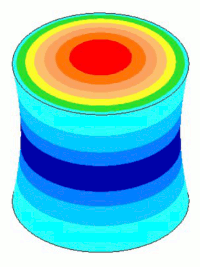
在动画过程中,每种颜色保持在其最初最大位移时的值不变。
位移比例
为了便于观察,图像中的振动位移被大大夸大了。
网站
- Internet Explorer 可能可以使用,但不受支持。
- 链接。
- 如果在低分辨率设备(如小型平板电脑)上浏览本网站,某些项目(树形菜单、公式)可能无法正常显示。如果必须使用平板电脑或类似设备,请尝试以横向模式浏览。
- 要使 Google 翻译正常工作,必须建立互联网连接。
- 公式 —
- 页面初次显示后,公式需要额外的时间才能正常显示。所需时间取决于公式的数量和复杂程度。进度将显示在页面底部,提示为 Typesetting Math(正在排版数学公式)。在排版完成之前,请不要刷新或滚动页面。
- 对于以斜体显示的公式,按住 CTRL 并单击公式可将其放大 2 倍。再次单击公式可恢复正常大小。(注:当鼠标悬停在公式上方时,光标形状不会改变,不会提示公式可点击。)
- 没有互联网连接时,公式将无法正常显示。
- 对于 A4 或信纸尺寸的纸张,四周留 12 mm 页边距时打印效果最佳。为避免右边距处被裁剪,左右页边距之和应小于 50 mm。
故障排除
- 图像变形。这可能是由您的浏览器引起的。
测试图像 — 下面的图像是一个圆。如果它显示为椭圆,则您的浏览器未能正确显示图像。
- 公式不显示。您看到的可能不是公式,而是 LaTeX 格式文本。要使 LaTeX 正确显示,您的浏览器必须允许运行 JavaScript。请检查浏览器的配置选项。
测试公式 — 如果您的浏览器配置正确,下面应显示为 E = m c2,而不是 LaTeX 格式文本 —
\begin{equation} E = m \, c^{2} \end{equation}
- 公式编号不显示。一般来说,每个公式都应有编号。如果没有,请尝试刷新页面。
- 目录和术语表树形菜单无法正常显示/操作。您的浏览器必须允许运行 JavaScript。请检查浏览器的配置选项。
修订
见此处。
隐私
本网站不收集任何用户信息,也不使用 Cookie。
Notes
Contents
Disclaimer
The information on this site is advisory. It is provided without guarantee of any kind.
Content
This site attempts to provide a central resource for the design of ultrasonic resonators. However, it is neither comprehensive nor is it the last word.
- Consult the Contents to find a particular topic.
- A topic is released when it contains sufficient information to be useful. Thus, a particular topic may be incomplete. Please contact the site to see if additional information may be available.
- If you are unsure of the meaning of a term, please consult the Glossary.
- Unless otherwise specified, all resonators are 20 kHz designs. However, all dimensions and mechanical performances can be linearly scaled to other operating frequencies. (Note that the effect of loads, where considered, may not necessarily scale linearly to other frequencies.)
Where possible, the dimensions of 20 kHz "standard" designs have been chosen so that they scale nicely to other common frequencies (15 kHz, 30 kHz, 35 kHz, and 40 kHz). This avoids some awkward dimensions. For example, for a 20 kHz cylindrical horn, a face diameter of 126 mm scales nicely whereas a diameter of 125 mm does not. (Note: not all dimensions can be chosen to scale nicely, especially to 35 kHz.) - When an equation shows a multiplication operation, the multiplication sign "x" (or "*") is not shown. However, adjacent multiplication factors will always be separated by at least a space in order to distinguish the individual factors. For example, Newton's second law of motion would be shown as \( F = m \, \ddot{u} \) rather than \( F = m\ddot{u} \).
- Unless otherwise stated:
- For experimental tests, all performance data and tuning rates include a transducer that drives the resonator.
- For finite element analysis, the transducer is not included (i.e., only the resonator is analyzed).
- All systems are linear.
- All stress values are von Mises.
- All materials are assumed to be isotropic and homogeneous.
- All aluminum resonators are made from Al 7075-T6.
- All titanium resonators are made from Ti-6Al-4V.
- All word processing documents and spreadsheets are in .od* (open document) format, viewable with OpenOffice or LibreOffice (free office suites).
- Various vendors and manufacturers are mentioned. However, such mention does not imply endorsement.
- Various individuals and companies have graciously provided images to this site for which acknowledgment has been given. However, such acknowledgment does not imply endorsement.
| Frequency (kHz) | Face diameter ("awkward" dimensions) |
Face diameter ("nice" dimensions) |
|---|---|---|
| 20 | 125.0 (scales awkwardly to other frequencies below) |
126.0 (scales nicely to other frequencies below) |
| 15 | 187.5 | 189.0 |
| 30 | 83.333... | 84.0 |
| 35 | 71.429... | 72.0 |
| 40 | 62.5 | 63.0 |
Units
Primary units are metric. Secondary units are imperial.
|
||||||||||||
|
In the above table, secondary units (used only occasionally) are shown in brackets [ ].
Amplitude
Important — Amplitudes have traditionally been specified as peak-to-peak values. However, acceleration forces, stresses, and strains are determined from peak amplitudes, rather than peak-to-peak. Thus, peak amplitudes will be used on this site (with a few legacy exceptions). For text where there may be any confusion, the amplitude will be written as "microns_peak". In equations, the amplitude will generally be written simply as \( U \) where peak amplitude is implied.
Drawings
See here.
Finite element analysis (FEA)
Orientation
Resonators are generally shown with the output face pointed upward. This orientation has been chosen because the face amplitude distribution is often most important for the application. Drawings use this same orientation.
Colors
|
FEA colors show the relative values of amplitude and stress — hot colors such as red indicate high values whereas cool colors such as blue indicate low values. Unless otherwise indicated, the colors do not indicate any actual values. Hence, the colors generally can't be compared between different resonators. For example, two horns may both show areas of "red" stress. However, these red areas only indicate where the stress is high — they do not indicate that the two horns have equally high stresses ; in fact, one horn could have substantially higher stress than the other. |
For actual resonators the amplitudes and stresses vary in a continuous manner (i.e., they don't make sudden stepped jumps). This is shown in the left image below. However, in order to clearly distinguish different performance regions, the FEA models are shown with striated colors (the right image below).
|
||||||||||
|
During animation each color remains constant at the same value that it originally had at maximum displacement.
Displaced scale
The vibration displacements in the images are greatly exaggerated in order to be discernable.
Site
- Internet Explorer may work but is not supported.
- Links.
- Links that access other pages of this site are displayed as link.
- Because this site is under early development, many topics may have little or no information. These links are displayed as No info on this link. (If you need further information (or if you just need clarification about a particular topic), please contact us.)
- Links to glossary terms are displayed as term.
- Links to external web pages that open in a new tab or window are displayed as link.
- If this site is viewed on a low resolution device such as a small tablet, then some items (tree menus, equations) may not display properly. If a tablet or similar device is required then try viewing in landscape mode.
- In order for the Google translation to work, an internet connection must be established.
- Equations —
- After a page is initially displayed, any equations will require additional time to display properly. The time will depend on the number and complexity of the equations. The progress will be displayed at the bottom of the page as Typesetting Math. Don't refresh or scroll the page until the typesetting has finished.
- For equations that are displayed in italics, CTRL+click on the equation will magnify it by 2x. Clicking again on the equation will restore normal magnification. (Note: when hovering above the equation, the cursor shape does not change to indicate that the equation is clickable.)
- Equations will not display properly without an internet connection.
- For A4 or letter sized paper, pages print best with 12 mm margins all around. To avoid clipping at the right margin, the sum of the left and right margins should be less than 50 mm.
Troubleshooting
- Images are distorted. This may be caused by your browser.
Test image — The following image is a circle. If it appears as an ellipse then your browser is not displaying images correctly. - Equations don't display. Instead of an equation you may just see LaTeX formatting text. In order for the LaTeX to display correctly, your browser must allow javascripts to run. Check your browser configuration options.
Test equation — If your browser is correctly configured then the following should display as E = m c2 rather than LaTeX formatting text —
\begin{equation} E = m \, c^{2} \end{equation}
- Equation numbers don't display. Generally, each equation should be numbered. If not, try refreshing the page.
- The Contents and Glossary tree menus do not display/operate correctly. Your browser must allow javascripts to run. Check your browser configuration options.
Revisions
See here.
Privacy
This site does not collect any user information and does not use cookies.